

It took weeks just to come up with a basic idea for a digital product five years ago - thinking through all the details, drawing up sketches, validating user flows, designing interface, working with developers.
75% of knowledge workers already use AI at work, according to Microsoft's Work Trend Index making AI one of the fastest-adopted workplace technologies.
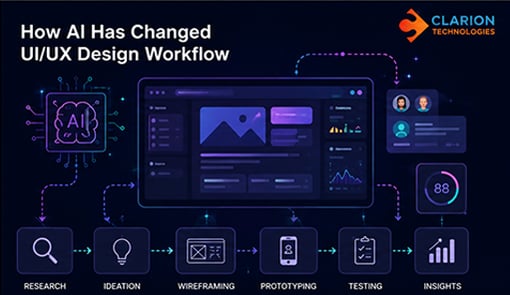
Nowadays, AI is able to develop layouts, come up with UX copy, make suggestions on designs, summarize the findings, and even build working prototypes in minutes.
But does it mean that the role of UI/UX designers will be replaced by AI? Absolutely not.
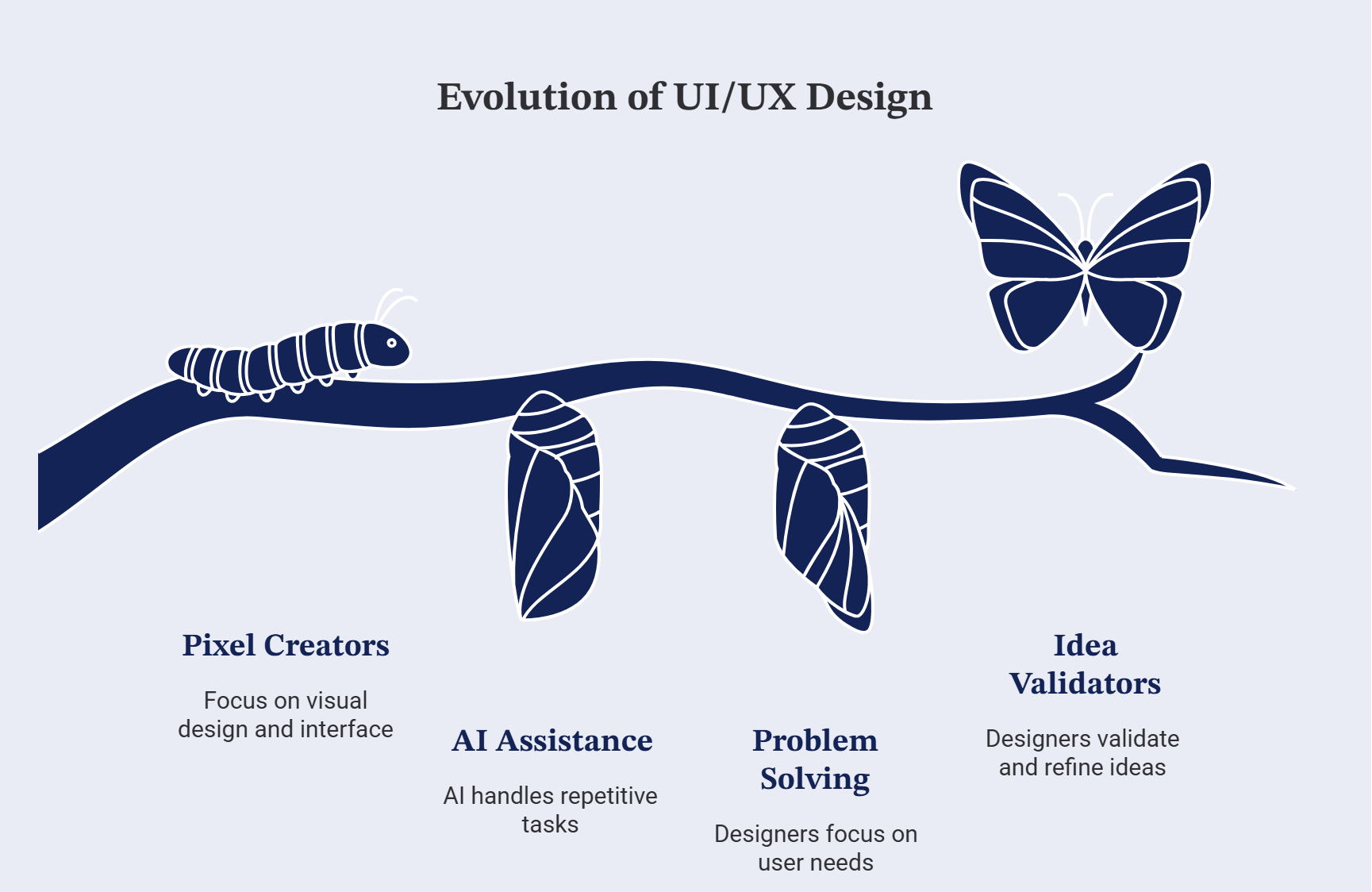
What AI has managed to do is completely change the position of UI/UX designers from being pixel creators to problem solvers and idea validators.
Why AI Has Become Essential for Modern UI/UX Design
Research by Microsoft and LinkedIn's Work Trend Index found that 75% of knowledge workers now use AI at work, with many reporting that AI helps them save time and focus on higher-value tasks.
Digital products development process has been evolving greatly in recent years. The pressure on businesses to release features faster, react rapidly to customer feedback and iteratively improve their products is growing. Additionally, users now demand consistent, intuitive, and personalized experience in each of their devices.
With these changing expectations, the role of UI/UX designers evolves too. Besides producing aesthetically appealing screens, designers should quickly validate hypotheses, cooperate closely with the development team, and make sure that each interaction provides value for users.
In this regard, AI technologies become an integral part of the design process. They do not eliminate creativity but allow to save time for routine tasks like sorting through research, producing quick prototypes and initial layouts, creating UX copy and experimenting with different design directions. With more time spared from routine activities, designers can concentrate more on solving user problems.
Since AI features now become a regular element of modern applications, UI/UX designers have to reconsider the process of designing the interface of such systems. Now they have to consider building trust, providing transparency, and keeping things simple along with visual aspects.
How AI Supports the UI/UX Design Process
AI is accelerating design workflows by automating repetitive tasks, allowing designers to spend more time on creativity, strategy, and solving real user problems.
Designers are starting to harness AI to simplify their day-to-day work and accelerate decision-making. And that’s where AI comes in, adding value at each step of the UI/UX design process, while keeping human creativity, empathy and strategy at the heart of it all.
Requirement Gathering
Every good design begins with one thing: understanding the problem. In practice, however, gathering requirements is not always straightforward. Information is often scattered across meeting notes, emails, documents, recorded calls, and conversations with different stakeholders. Before a designer can start thinking about layouts and user flows, all that information needs to be assembled into one clear picture.
That’s where AI is actually useful.
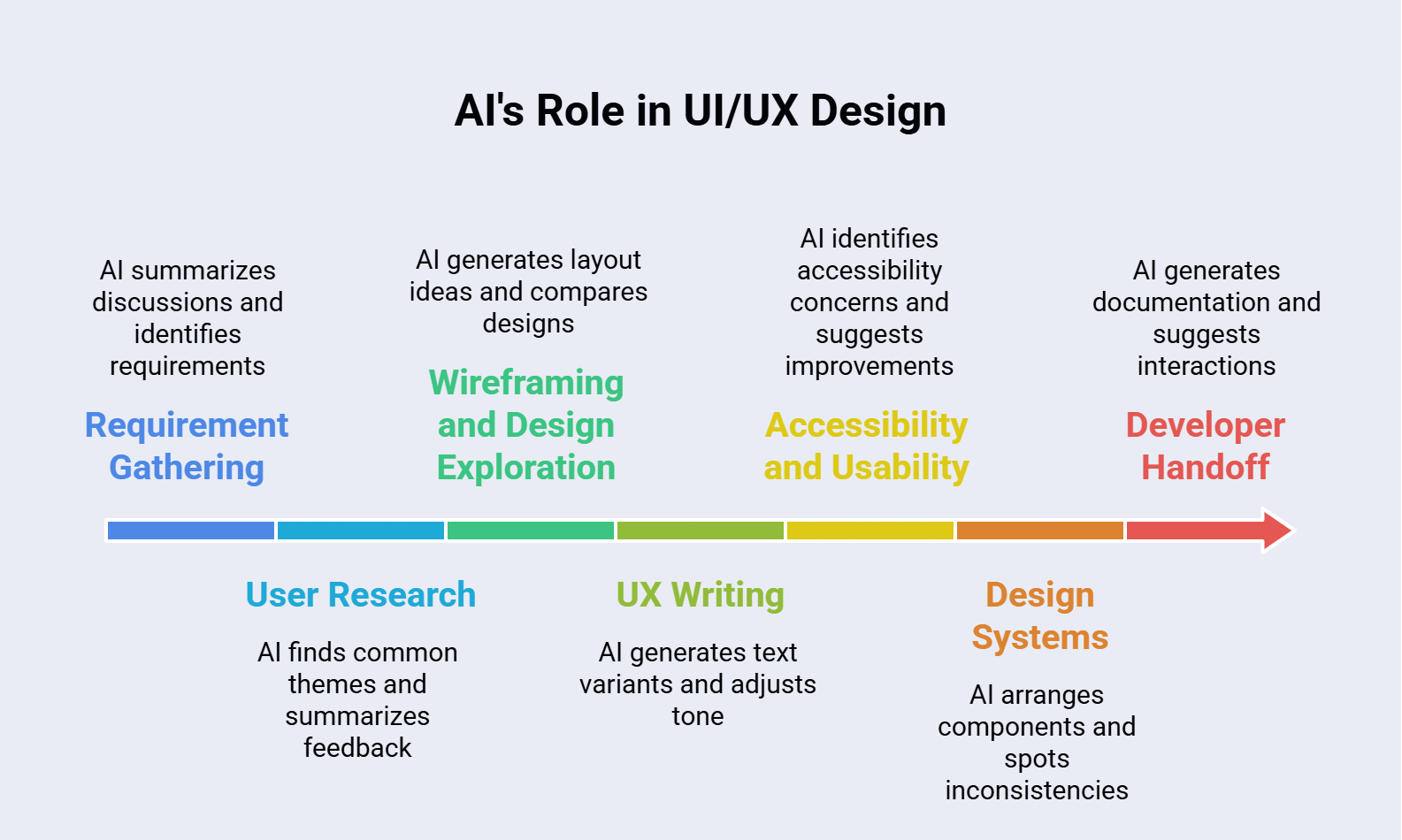
Instead of spending hours reading lengthy documents or going through notes, I employ AI to summarise discussions, identify essential requirements, highlight possible shortcomings, and even formulate questions we might have overlooked. It helps me get to the core of the project much faster.
That doesn’t mean I blindly believe everything AI recommends. Human judgement still needs to be applied to understand the client’s business goals, user expectations, and project constraints. AI is basically a smart assistant that helps me process information more efficiently and gives me more time to ask the right questions and design the right solution.
User Research
User research is arguably the most valuable part of the design process, but it can also be one of the most time-consuming. It takes considerable effort to go through interview transcripts, survey responses, usability test recordings, and stakeholder feedback before meaningful insights begin to emerge.
AI speeds up this process by finding common themes, summarising large volumes of feedback, and clustering similar user concerns. Instead of spending hours organising information, I get to spend more time understanding why users behave the way they do and how the product can better serve their needs.
That said, AI can only interpret the information it has been given. It cannot see a user’s frustration during a usability test, feel the emotion behind their feedback, or replace conversations with real people. Those human insights remain at the heart of good UX design, while AI simply helps bring them into focus more efficiently.
Wireframing and Design Exploration
Wireframing has always been an iterative process. Exploring multiple layouts, testing different user flows, and validating ideas often require several rounds of revisions before arriving at the right solution.
| Before AI | After AI |
|---|---|
| Starting every design from a blank canvas | Generating multiple layout ideas in minutes |
| Exploring one or two concepts at a time | Comparing several design approaches simultaneously |
| Manually refining each variation | Using AI-generated concepts as a starting point for refinement |
| Spending more time creating initial layouts | Spending more time improving usability and user experience |
Wireframing and Design Exploration
Wireframing has always been an iterative process. Exploring multiple layouts, testing different user flows, and validating ideas often require several rounds of revisions before arriving at the right solution.
AI doesn't replace the creative process—it accelerates the exploration phase. By reducing the time spent creating initial concepts, designers can focus on evaluating ideas, refining interactions, and building experiences that align with user needs and business goals.
UX Writing
A successful user experience depends not only on a good user interface but also on the language users encounter while interacting with it. Button labels, form descriptions, error and success messages, and onboarding copy all play an important role in shaping the overall experience.
AI can act as a valuable brainstorming partner for UX writing. It helps generate multiple content variations, simplify complex messages, and adapt the tone of voice for different target audiences.
However, effective UX writing goes beyond generating text. Every piece of copy should reflect the brand's voice, guide users smoothly through their journey, and provide clear answers whenever users need assistance.
Accessibility and Usability
Designing a great user experience means creating products that are both accessible and easy to use. Designers must consider many details, from maintaining sufficient colour contrast and readable typography to ensuring proper keyboard navigation and intuitive interaction patterns.
AI can be a helpful assistant during design reviews. It can identify potential accessibility issues, recommend improvements for readability, detect inconsistencies in UI patterns, and highlight usability concerns that might otherwise go unnoticed.
While accessibility cannot be fully automated, real usability depends on understanding how people interact with a product. AI can suggest improvements, but it is ultimately the designer's responsibility to create an inclusive and user-friendly experience.
Design Systems
As digital products continue to evolve, consistency becomes increasingly important. A well-maintained design system ensures consistency across components, styles, and interactions while making collaboration between designers and developers more efficient.
AI can assist by organising components, generating documentation, identifying inconsistencies, and recommending reusable patterns. This reduces the time spent on repetitive maintenance tasks and allows designers to focus on improving and expanding the design system.
However, a design system is much more than a collection of reusable components. It represents the product's visual language, usability principles, and design standards. Deciding which standards to establish, maintain, or evolve remains the responsibility of the design team.
Developer Handoff
No matter how strong a design is, its success ultimately depends on accurate implementation. That is why an effective developer handoff is a critical part of the UI/UX process. Clear design specifications, well-structured components, and detailed interaction documentation help bridge the gap between design and development.
AI has made this stage more efficient by generating design documentation, describing component behaviour, suggesting interaction details, and identifying areas that may require additional clarification. This helps reduce misunderstandings and ensures developers have a clearer understanding of the intended design.
Even so, developer handoff remains a collaborative process. Design decisions are often influenced by business requirements and technical constraints that AI cannot fully understand. Ongoing communication between designers and developers is still essential to deliver the best possible product.
Where AI Still Falls Short
Now that I have tested the power of AI in design, one thing is obvious—it is a very helpful tool, but it is far from being a designer.
AI can generate layouts, suggest user flows, create UX copy, and analyse large amounts of data within seconds. However, it cannot truly understand people. It cannot empathise with frustrated users, challenge business assumptions, or understand the context behind human behaviour. Those abilities come from experience, collaboration, and continuous learning.
It is also noticeable that AI often produces predictable design solutions. While it is excellent for generating ideas and inspiration, it may not capture the unique needs of a specific product, brand, or audience. That is why I treat AI-generated concepts as a starting point rather than a finished solution.
The strongest design process combines human creativity, empathy, and critical thinking with AI's speed and analytical capabilities. Rather than replacing designers, AI enables them to spend more time solving meaningful problems.
Best Practices for Designers
AI is evolving rapidly, and so is the way designers use it. Over time, I've found that the best results come from treating AI as a collaborator rather than relying on it to make every decision.
- Start with the problem, not the prompt. Understand the user's needs and business goals before asking AI for suggestions.
- Use AI to explore, not to finalize. Let it generate ideas, but always refine them based on usability, accessibility, and project requirements.
- Validate with real users. AI can suggest solutions, but only user feedback can confirm whether those solutions actually work.
- Review everything critically. Treat AI-generated content as a first draft. Always verify information, design recommendations, and UX copy before using them.
- Protect sensitive information. Be mindful of the data you share with AI tools, especially when working with confidential client projects.
- Keep learning and experimenting. New AI capabilities are emerging constantly. Staying curious and testing new workflows helps designers discover better ways to work without losing the human touch.
The Future of AI in UI/UX
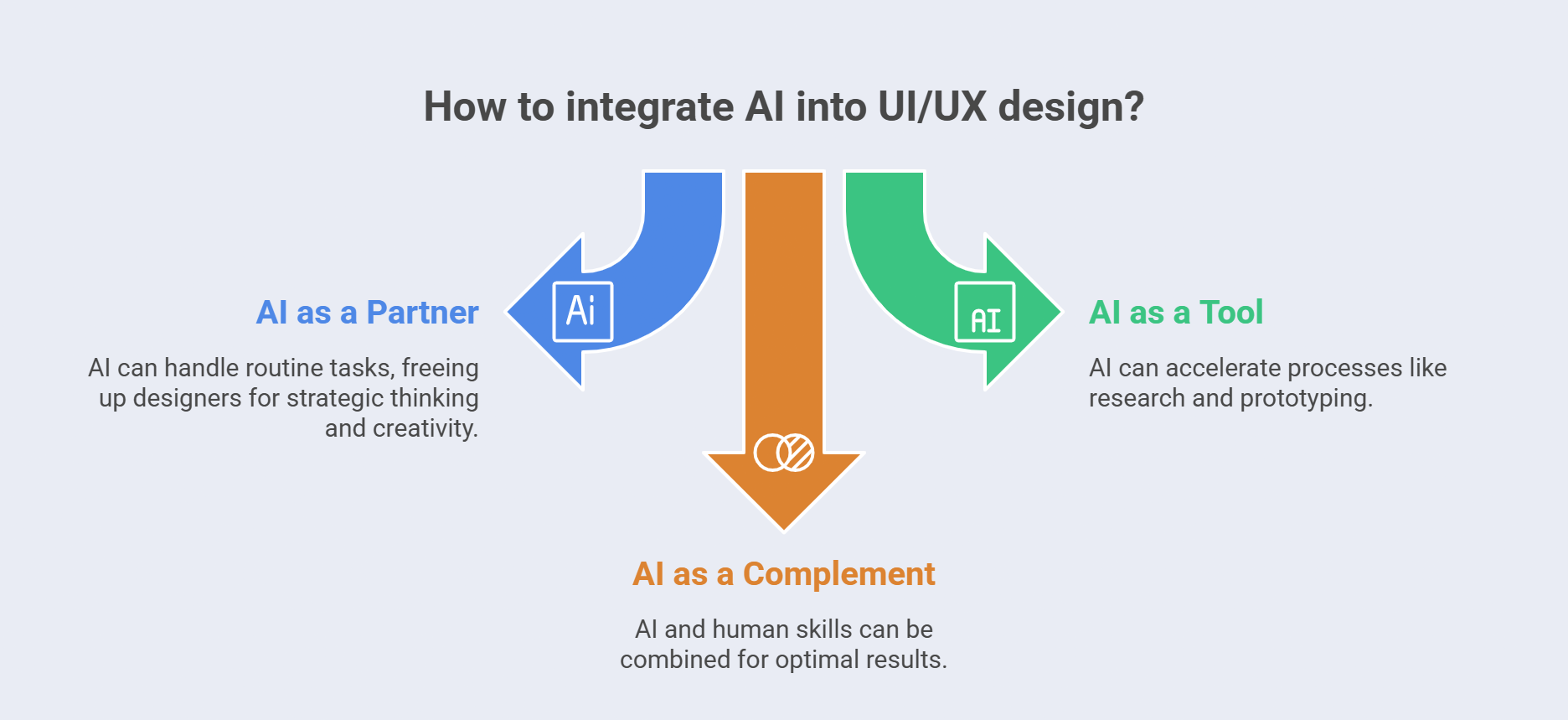
The future of UI/UX isn't AI versus humans—it's AI working alongside designers to create better digital experiences.
While many associate AI with the future, it is already becoming part of our everyday design workflows. As AI capabilities continue to evolve, it will play an even greater role in user research, prototyping, personalization, accessibility, and collaboration throughout the design process.
As these technologies advance, the role of designers will continue to evolve as well. Instead of spending countless hours on repetitive tasks, designers will have more opportunities to think strategically, innovate, and create meaningful user experiences. While AI can automate routine work, empathy, creativity, and a deep understanding of human behaviour will become even more valuable.
UI/UX is not about choosing between humans and AI—it's about combining the strengths of both. AI can improve efficiency and accelerate workflows, but designers remain essential for bringing creativity, context, critical thinking, and problem-solving into every project.
For me, AI has become a valuable design partner. It reduces the time spent on repetitive tasks and allows me to focus on what I enjoy most—designing thoughtful experiences that make technology simpler and more enjoyable for people.
Conclusion
There’s no doubt that artificial intelligence has changed the way we design digital products. It helps us work faster, explore more ideas, and simplify many of the repetitive tasks involved in the design process. Yet, after using AI across different stages of UI/UX design, one thing remains clear—great design has always been, and will always be, about people.
AI excels at generating layouts, suggesting content, and analysing large amounts of data. However, it cannot replace empathy, creativity, or the ability to truly understand users and their needs. These human qualities continue to be the foundation of every successful digital product.
As designers, our goal is not to compete with AI but to use it wisely. By combining AI’s speed and efficiency with human creativity, critical thinking, and problem-solving, we can create products that are not only functional and visually appealing but also meaningful and enjoyable to use.
At Clarion Technologies, we believe AI delivers its greatest value when paired with human expertise. By integrating AI into our UI/UX design and development processes, we help businesses build digital products that are intuitive, scalable, and aligned with real user needs.
The future of UI/UX belongs to designers who embrace innovation while keeping people at the centre of every experience. AI is a powerful enabler, but it is the combination of intelligent technology and human expertise that creates digital products people genuinely enjoy using.
Author

Praviin Dhhonne – Tech Lead, UI/UX
Praviin is a Tech Lead with over 16 years of experience in UI/UX Design and Development, leading the design and delivery of intuitive, scalable, and user-centered digital experiences. He combines deep expertise in UX strategy, interface design, front-end development, design systems, and AI-powered design practices to help organizations create innovative products that balance business goals with exceptional user experiences.