

Data is becoming more central to how your business functions at the core. It’s time to rethink your data analytics strategy. You need to leverage powerful data analytics solutions that align with your business objectives while addressing the growing need for data compliance and real-time insights.
Gartner states that 80 percent of digital organizations won’t achieve measurable business outcomes if they are unable to adopt a modern approach to data governance.
No doubt, Microsoft Power BI services and Microsoft Fabric solutions can safeguard your data and maximize business growth. However, as a CTO, CIO, CAIO, or an IT decision-maker, it isn’t easy to identify the one that perfectly suits your business requirements.
Not to worry, this blog post will walk you through a detailed Microsoft Fabric vs Power BI comparison to help you make the right decision for your company. It will help you answer pressing questions – How to decide between Power BI and Microsoft Fabric for my organization? Do enterprise teams need both Power BI and Microsoft Fabric? Let’s begin!
Choosing Between Microsoft Fabric and Power BI: Why This Decision Matters
While choosing the one that doesn’t suit your data ecosystem can increase long-term costs, selecting the right one can enable 360-degree governance, scalability, collaboration, and secure data access. Do you think this is all it takes to outshine your competitors?
A report by S&P Global states that 90 percent of enterprises consider data as one of the most significant factors for their overall business growth. However, only 29 percent of enterprises say they are able to make decisions based on data.
This means it’s not just about a tooling choice. It’s about embracing an approach that enables rapid scalability, advanced data analytics, AI-driven insights, and reduced data silos. Concretely, it’s about creating a future-ready environment that strengthens your decision-making capabilities.
With enterprises bound to generate 230 - 240 zettabytes of data in 2026 (DesignRush), it’s essential to consider the underlying factors.
Increasing Data Complexity – Gartner says 80 percent of enterprise data is unstructured. This calls for unified data analytics.
Growing AI-Driven Expectations – McKinsey states that organizations leveraging integrated data platforms can accelerate AI deployment by 3x.
Rising Cost Optimization Pressure – A TD Securities survey predicts cloud spend to grow over 22 percent year-over-year. The right choice can significantly decrease data duplication and operational overheads.
Expanding Scalability Needs – Your decision should suffice for distributed teams and global operations. It should support real-time analytics and seamless cross-functional collaboration.
Microsoft Power BI: Rapid Insights Activation for Everyday Decisions
Microsoft Power BI services are a go-to option for organizations looking for interactive dashboards, governed metrics, and enterprise reporting. They can help IT decision-makers enable faster decisions across teams, reducing the data-to-action time.
According to Gartner, Microsoft Power BI has more than 6 million users, with 97 percent of Fortune 500 companies using it to democratize data insights.
Some key benefits of using Microsoft Power BI include:
-
Gaining quick insights without complete dependency on engineering teams.
-
Leveraging executive-ready dashboards that are accessible across departments.
-
Accelerating business reporting cycles by centralizing KPIs and success metrics.
-
Improving decision-making accuracy with fully-governed semantic models.
-
Boosting stakeholder adoption with a low learning curve for business/functional teams.
-
Streamlining reviews and forecasting with faster AI-based visualization of trends, anomalies, and cost drivers.
Microsoft Fabric: Enterprise-Wide Value Creation with Unified Data
Microsoft Fabric services can help you prepare for a data analytics world where real-time insights, automation, and AI are at the forefront. They enable your teams to go beyond reporting and explore business outcomes like scalability, long-term data maturity, and intelligent automation.
“25,000 organizations worldwide are currently using Microsoft Fabric, including 67 percent of Fortune 500 companies. Out of which, 84 percent are using it across three or more workflows,” says Arun Ulagaratchagan, Corporate Vice President, Azure Data – Microsoft.
Some key benefits of using Microsoft Fabric include:
-
Breaking down data silos to support engineering, analytics, and business users.
-
Reducing operational overheads by replacing disparate systems with a unified, SaaS architecture.
-
Improving time-to-insight for customer analytics, product intelligence, AI adoption, and predictive modeling.
-
Strengthening data compliance and governance using integrated Purview capabilities.
-
Minimizing friction across data collation, processing, analytics, and visualization.
-
Implementing AI-native features to improve data quality, accelerate modeling, and automate workflows.
So, do we need Microsoft Fabric if we already use Power BI? Which is better for AI-driven analytics - Power BI or Fabric? Let’s understand with a detailed comparison.
Microsoft Fabric vs Power BI: Side-by-Side Comparison
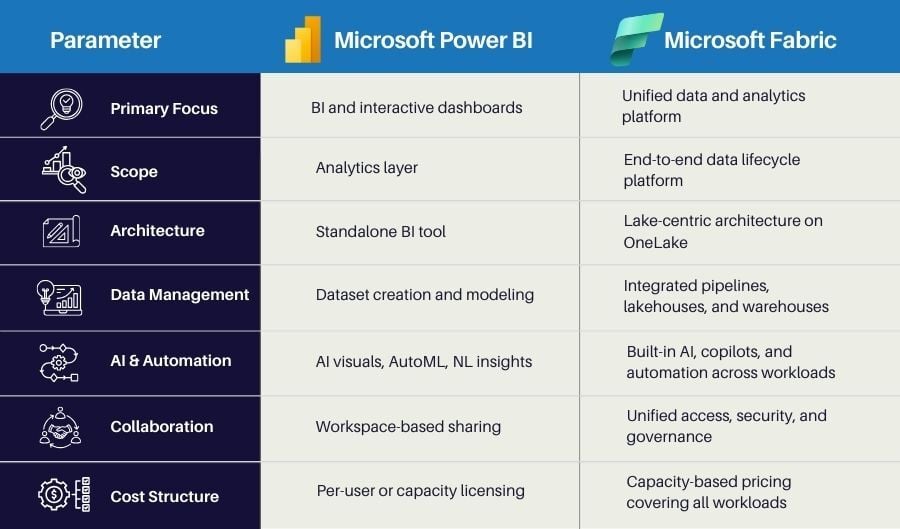
Power BI and Microsoft Fabric bring their own set of advantages, capabilities, and uniqueness to the table. We have compared both platforms on various parameters to help you make the right choice and end the Power BI vs Fabric debate once and for all.
#1 Primary Focus
Microsoft Fabric services act as an end-to-end data and analytics foundation that supports organization-wide decisions. It helps you centralize data to minimize operational bottlenecks and enhance analytics maturity.
On the other hand, Microsoft Power BI services deliver actionable insights through engaging visuals, dashboards, and reports. It assists you in monitoring KPIs, tracking performance, and democratizing insights with ease.
#2 Scope
If you are a business leader looking to modernize your enterprise data or enable cross-team analytics, Microsoft Fabric services can be your go-to option. These services can also help you with seamless AI adoption and multi-source data consolidation.
However, if you are an IT decision-maker seeking dedicated assistance to operationalize insights without needing large data-platform investments, then Microsoft Power BI services can help you achieve your business goals.
#3 Architecture
This is one of the most important parameters to be taken into consideration for the Microsoft Fabric vs Power BI comparison.
With the help of Microsoft Fabric, you can establish a unified data ecosystem that boosts data reliability, decreases duplication, and strengthens compliance. Microsoft Power BI, on the flip side, provides a flexible analytics layer that perfectly fits into your existing business systems with minimal disruption.
#4 Data Management
Another important factor you need to evaluate while comparing Power BI vs Fabric is data management.
Microsoft Fabric implementation can help your business maintain clean, well-structured, and secure data at scale. It reduces the time your teams spend on data wrangling and helps you build a long-term data strategy.
Integrating Power BI into your existing system can help your teams work with ready data to build insights when required. It can help you manage and analyze data through smaller datasets and established data pipelines.
#5 AI & Automation
You can enable advanced AI-driven workflows using Microsoft Fabric capabilities. Automating data preparation, introducing predictive analytics across large datasets, and ensuring ML-driven decision support also becomes easier.
On the contrary, Microsoft Power BI implementation can help you take advantage of powerful AI-based features, such as automated insights, natural language queries, and conversational analytics. It’s a way toward enhancing daily reporting using intelligent dashboards, eliminating the need to manage complex AI structures.
#6 Collaboration
Be it data analysts, BI experts, technology professionals, or business executives – all teams can work in sync using Microsoft Fabric services. You can standardize analytics processes by breaking down data silos.
Power BI enables workspace-based sharing capabilities to ensure complete transparency and visibility across varied functions, reports, and KPIs. It empowers your decision-making loops without requiring dedicated support from technical teams.
#7 Cost Structure
Microsoft Fabric integration works well if your organization is seeking enterprise-scale analytics while ensuring long-term ROI by consolidating tools. It offers capacity-based pricing to support cost predictability at scale.
However, if you just want your teams to gain real-time insights for decision-making without any costly investments, you need to implement Microsoft Power BI. It offers a per-user or capacity-based licensing structure.
Now that you have a clear view of Microsoft Fabric and Power BI capabilities, you are better positioned to determine their business value. To give you a better idea of what your ideal choice can be, let’s check out some customer success stories created by Clarion Technologies using Microsoft Power BI services and Fabric solutions.
Customer Success Stories: When Microsoft Power BI Is the Right Fit
#1 Success Story
Business Use Case
A leading language solutions provider was facing data management and integration challenges. Their sales team faced delays of up to two weeks in accessing vital information. They sought a solution that could streamline data collection, track individual/group performance, and ensure accurate decision-making.
Clarion’s Strategic Solution
We assisted the client in building a robust Power BI solution to enhance data gathering, secure data integrity, and improve collaboration between the sales team and other cross-functional departments. We also automated scheduling of data updates using Microsoft Flow.
The Impact
-
Eliminated long delays in data access
-
Improved decision-making with real-time insights
-
Automated processes for efficient report generation
-
Enhanced sales team productivity and efficiency
To know more about our solution, download success story.
#2 Success Story
A renowned oil and gas company was facing difficulties in managing multiple data streams. They wanted to gain valuable insights but faced challenges due to traditional, inaccurate reporting and disparate data sources. They were looking for a solution to improve data consolidation and real-time insights.
Clarion’s Strategic Solution
Clarion’s Power BI experts helped the client build custom dashboards with real-time data visualization capabilities using Power BI. We helped them implement DAX for advanced analytics and maximized data security with row-level security.
The Impact
-
Accelerated decision-making by 40 percent
-
Fast-tracked response to operational issues by 30 percent
-
Increased business productivity by 25 percent
-
Enhanced data accuracy and consolidation
To know more about our solution, download success story.
Customer Success Stories: When Microsoft Fabric is the Right Fit
#1 Success Story
Business Use Case
A large retail chain was facing difficulties while monitoring store-level performance. They were unable to identify accurate product movement, leading to regular stockouts/overstocking scenarios and errorful decision-making.
Clarion’s Strategic Solution
We helped the client build a custom unified data platform for centralized data visibility using Microsoft Fabric services. We also enabled real-time inventory tracking capabilities and data integration across POS, ERP, and online sales tools for their data experts.
The Impact
-
Enhanced forecast accuracy from 68 - 89 percent
-
Minimized stockouts/overstock situations by 22 percent
-
Saved $18.7 million with reduced stockouts
-
Improved inventory turnover by 15 percent
#2 Success Story
Business Use Case
A global company has 3 enterprise apps that generate underlying datasets within disparate databases and tables. They wanted to combine this data in order to refine analytics, decrease redundancies, and enable comprehensive reporting and governance.
Clarion’s Strategic Solution
With Clarion’s expertise, the client was able to set up a modern data lake on top of Microsoft Fabric. We also helped them utilize the capabilities of Cloud Composer for ETL orchestration and Power Apps for real-time request management.
The Impact
-
Unified 11.4 billion records from 3 apps
-
Reduced duplicate data storage by 72 percent
-
Saved $280K annually
-
Increased reporting speed from 14 minutes to 8 seconds
Power BI + Fabric: Combining Capabilities for Strategic Decision-Making
After exploring the use cases, it’s time to answer some triggering questions that most business leaders have in mind while choosing between the two platforms. Is Microsoft Fabric replacing Power BI? Can Power BI fit into the Microsoft Fabric ecosystem? Can I use both Power BI and Fabric for my data analytics requirements?
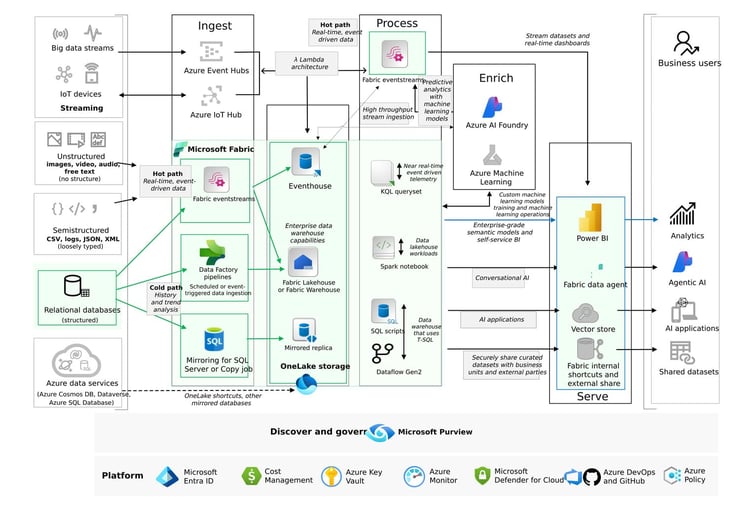
Yes, you can. Many companies are already using them as a combination to deliver measurable business outcomes. When Power BI and Microsoft Fabric work together rather than as isolated platforms, you experience next-gen data analytics and management capabilities.
 Source: Microsoft
Power BI provides business leaders with a quick, intuitive way to consume insights. On the other hand, Microsoft Fabric offers a scalable data foundation to ensure those insights are precise, governed, and futuristic. Their combined force helps address the growing pressure on your organization to modernize the analytics stack without disrupting existing business workflows.
Power BI becomes a natural ally to Microsoft Fabric’s shared data ecosystem, ensuring consistent, secure insights across functions, such as finance, logistics, supply chain, sales, and customer experience. Essential advantages of using this combined approach are as follows:
-
Centralized analytics setup to reduce data duplication and eliminate operational overheads.
-
Solid enterprise-wide data security to ensure consistent KPIs for all key stakeholders.
-
Faster insight delivery to help your teams respond quickly to market fluctuations.
-
Shared AI capabilities to elevate decision-making across diverse business functions.
-
Improved ROI over time as both tools evolve within the same strategic roadmap.
Choosing the Path Forward: How Clarion Can Help
Selecting Microsoft Fabric, Power BI, or a combined approach requires more than just understanding features. It demands a structured alignment with your organization’s business goals, data maturity, operational priorities, and modernization roadmap. Clarion enables enterprises to bridge this gap by transforming technology possibilities into measurable business outcomes.
Clarion is a Microsoft Gold Partner helping CTOs, CIOs, CAIOs, CFOs, and technology leaders assess the current analytics ecosystem to identify ROI opportunities and design a future-ready analytics architecture. Our Power BI and Microsoft Fabric experts ensure end-to-end implementation that supports governance, scale, and decision velocity.
We guide you from strategy to execution – whether you need to advance legacy BI systems, eliminate data silos, or amplify business intelligence with AI-powered infrastructure. Connect with technology experts at Clarion to get started right away!